Getting Started with the FRDM Automotive S32K358 Development Board for General Purpose

上次修改时间: Jun 4, 2026 new 支持 FRDM-A-S32K358开发板

本文档内容

  • 1

    Out of the Box
  • 2

    Get Software
  • 3

    Plug It In
  • 4

    Build, Run

1. Out of the Box

The NXP FRDM-A-S32K358 features dual Arm® Cortex®-M7 cores configured in lockstep mode along with a single Arm Cortex-M7 core running at 240 MHz, ASIL-D safety hardware, 8 MB of flash memory, Hardware Security Engine B (HSE B), over-the-air (OTA) support, advanced connectivity, floating-point unit (FPU) and low-power.

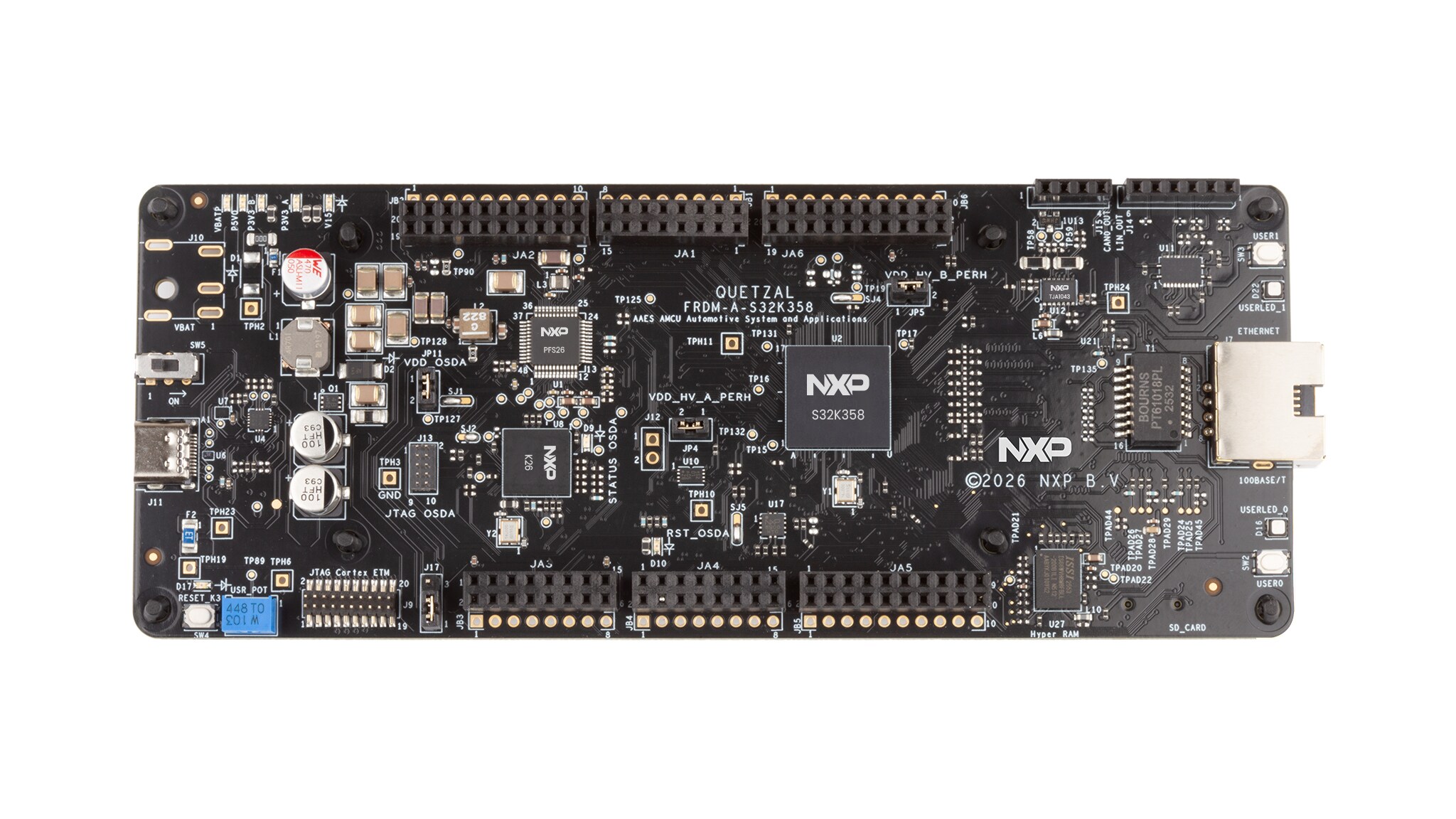
FRDM-A-S32K358 Development Board Top View

FRDM-A-S32K358 Development Board Top View

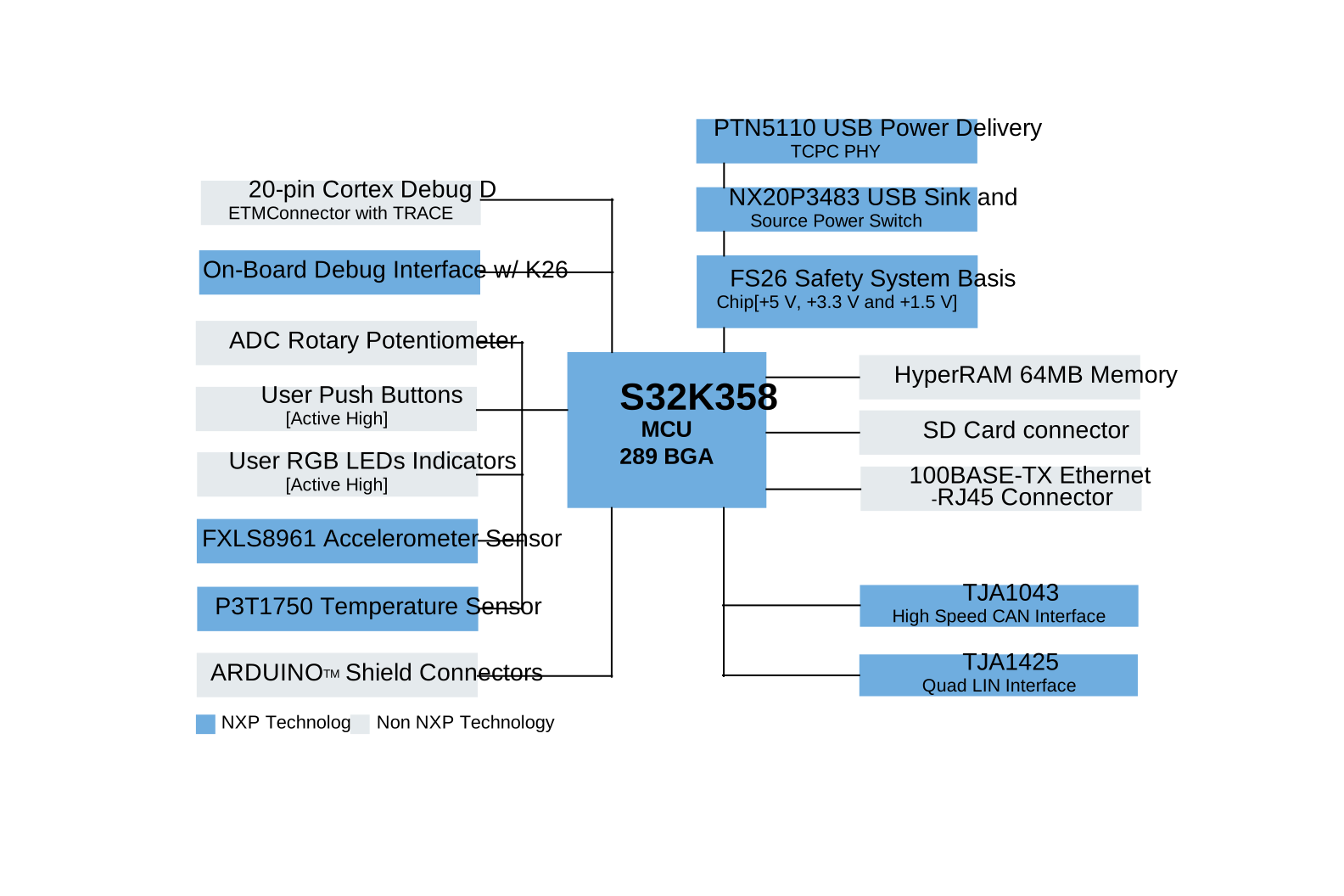
FRDM-A-S32K358 Block Diagram

FRDM-A-S32K358 Block Diagram

1.1 Kit Contents/Packing List

The kit contents include:

  • Assembled and tested development board in an antistatic bag
  • Quick Start Guide
  • USB Type-C cable

1.2 Minimum System Requirements

For board evaluation, you will need a Windows PC. For best results, the PC should be USB-enabled and running on either Windows 7, 10 or 11.

1.3 Software

You will also need to install software for board evaluation. All listed software is available on the development board's information page at FRDM-A-S32K358. The software includes:

  • GUI
  • Flexera

2. Get Software

2.1 Board Features

  • NXP system basis chip (SBC) FS26
  • USB-Type C port
  • Open Serial and Debug Adapter (OpenSDA) debug with the onboard K26 microcontroller (MCU)
  • One 20-pin Joint Test Action Group (JTAG) connector
  • Two push buttons
  • One potentiometer
  • Two RGB LED
  • One 64 MB HyperRAM memory
  • One SD card connector

2.2 Board Description

The NXP FRDM-A-S32K358 features dual Arm Cortex-M7 cores configured in lockstep mode along with a single Arm Cortex-M7 core running at 240 MHz. The board also includes ASIL-D safety hardware, 8 MB flash, Hardware Security Engine B (HSE B), over-the-air (OTA) support, advanced connectivity, floating-point unit (FPU) and low-power. It includes the NXP SBC FS26, which provides +5.0 V and +3.3 V power rails for safety-critical applications. The FRDM-A-S32K358 integrates the NXP PTN5110 USB Power Delivery (PD) physical layer (PHY), enabling high-voltage, high-current power and data through a single USB Type-C® port.

2.3 Board Components

The FRDM-A-S32K358 is equipped with an integrated OpenSDA debug, an onboard K26 microcontroller unit (MCU) and a the USB Type-C port por that supports multiple debug interfaces, including a 20-pin JTAG connector for external tools and convenient connectivity.

Additional features include two push buttons, a potentiometer, two RGB LEDs, a 64 MB HyperRAM memory and access to selected MCU input/output (I/O) pins for prototyping.

The inclusion of Ethernet 100BASE/T with the RJ45 connector, Controller Area Network Flexible Data-Rate (CAN FD) at 5 Mbit/s, and Local Interconnect Network (LIN) at 2.1/SAEJ2602 PHYs—powered by the TJA1043 and TJA1425 transceivers—ensure reliable communication for automotive and industrial applications. The onboard automotive-grade NXP FXLS8961 accelerometer and NXP P3T1750 temperature sensor provide real-time environmental feedback.

2.4 Install Software

  1. Go to the software bundle using the following link FRDM Automotive Bundle
  2. Click Generate to download
  3. Run the NXP Multi Installer
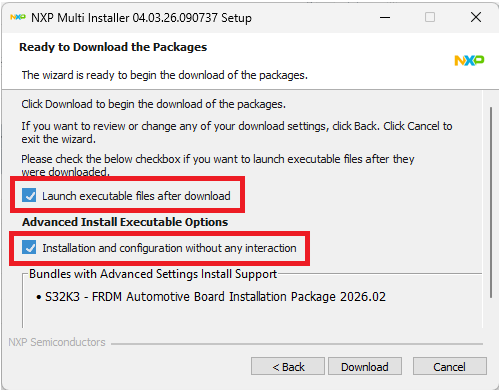
  4. By selecting “Launch executable after download” and “Installation and configuration without any interaction” the FRDM Bundle will be installed alongside all its available components.

    NXP Multi Installer

    NXP Multi Installer

    All the Software and Tools are now installed and configured automatically.

  5. Launch S32 Design Studio for S32 Platform 3.6.5 from the shortcut that has been created on your desktop

3. Plug It In

The FRDM-A-S32K358 is a rapid prototyping board based on the S32K3X8EVB-Q289. As it is not intended for final production use, the board includes a primary power-supply option through USB PD, connected to the FS26 SBC. Details of this configuration are provided in Table 1. See UM12541, FRDM-A-S32K358 Development Board User Manual for further details.

Mode Max voltage / Current supported Description
PD with USB Type-C Connector Typical input: +5 V / 3 A
Maximum Supported: +20 V / 3 A

By default, the FRDM-A-S32K358 is powered via the J11 USB Type-C connector. It is recommended to use the USB Type-C cable included in the box, or any cable that supports USB Power PD, to ensure full functionality of the board. Using an alternative cable may result in limited current supply and reduced performance.

To power the board properly, a USB-C PD–compatible power source is needed, such as a USB-C PD charger or a laptop with PD support. While most modern laptops support USB PD, verify your device’s capabilities before use. Using an alternative cable may result in limited current supply and reduced performance.

The FRDM-A-S32K358 supports input voltages up to 20 V. However, based on FS26 SBC recommendations, it is ideal to operate within 9 V, 12 V or 15 V ranges with at least 1 A. Achieving these voltages and level requires proper negotiation between the USB PD source and the PD PHY (PTN5110). For guidance on implementing this negotiation with the S32K358, consult local NXP field application engineer (FAE) or available code in the NXP Application Code Hub (ACH) website.

The FS26 manages power regulation by converting the VBAT input into stable voltage rails required by the S32K358’s power domains.

Normal Operation with Barrel Connector +12 V / 2 A The second power supply method for the FRDM-A-S32K358 involves connecting an external +12 V / 2 A power source to the barrel jack connector (J10).

This option is disabled by default and requires manual soldering of the following components to enable it:
  • J10: Barrel connector
  • C1, C9: Input capacitors
  • D1: Protection diode
Once these components are populated, the board can be powered through J10 as an alternative to USB Type-C PD.

4. Build, Run

4.1 Build, Run

Step sequence Description
1. Connect the USB Type-C cable to the J11 connector to supply power to the board.
2. To power on the board, change the default position of switch SW5 to setting 2–3 setting.
3. Verify that all power indicator LEDs on the board are illuminated.
Interface FRDM-A-S32K358 Reference / Signal Default configuration Description / Comment
MCU U2 S32K358 MCU S32K358 Arm Cortex-M7, 240 MHz, 8 MB flash, CAN FD, HSE B security, 289 molded array process ball grid array (MAPBGA)
Supply Peripheral Jumpers JP4 1 - 2 Selects the peripherals input supply
JP5 1 - 2
MCU Power Supply VDD_HV_A +3.3 V The reference voltage of +3.3 V is supplied by the FS26 low-dropout (LDO)1 regulator and routed to the VDD_HV_A power domain of the S32K358 (5 V can be supplied on VDD_HV_A with R806 [FS26_VTRK1])
VDD_HV_B +3.3 V The reference voltage of +3.3 V is supplied by the FS26 LDO2 regulator and routed to the VDD_HV_B power domain of the S32K358
V15 +1.5 V The reference voltage of +1.5 V is supplied by the FS26 Core voltage (VCORE) regulator and routed to the V15 core power domain of the S32K358.

(Optionally, the V15 rail can be powered through an external transistor controlled by the S32K358 so to enable this configuration, transistor Q5 and circuitry must be populated and solder jumper SJ4 must be properly routed)
V11 +1.1 V Core logic supply internally generated
On-Board Debug OpenSDA J11 Enabled The USB Type-C connector is configured by default as the primary interface for debugging
JP11 1 - 2 JP11 is routed as default enabling the OpenSDA voltage
PTA15 – LPUART6_RX Enabled For PC serial communication.
PTA16 – LPUART6_TX Enabled
JTAG J9 Disabled The JTAG interface of the S32K358 MCU is accessible via a 20-pin Arm Cortex Debug + plus Embedded Trace Macrocell (ETM) connector (to enable this interface, jumper JP11 [OpenSDA voltage] must be removed)
USB Type-C PD J11 Enabled By default, the USB Type-C connector is configured as the primary interface for USB PD (the included cable—or any USB-C cable that supports PD—can be used to power the board)
SW5 1 - 2 If the power source connected to the board supports USBC communication, switch SW5 turns the board on or off based on the connection or disconnection of the CC lines, so by default the board is off
VBUS_IN +5.0 V By default, the voltage on the VBUS_IN line is +5.0 V (to request a higher voltage via USB Power PD, a valid voltage negotiation must be initiated through the inter-integrated circuit (I²C) interface with the PTN5110 controller and the board supports up to 20 V—with 9 V, 12 V or 15 V recommended for typical operation)
PTC7 – LPI2C_ SCL Enabled PTC7 LPI2C serial clock (SCL) is routed by default to the PTN5110 and NX20P3483
PTC6 – LPI2C_ SDA Enabled PTC6 LPI2C serial data (SDA) is routed by default to the PTN5110 and NX20P3483
Ethernet U14 Enabled By default, the Ethernet interface is routed in RMII mode to the KSZ8091RNDIA 100BASE-T Ethernet PHY, which is connected to the RJ45 connector (J7)
QUAD Local Interconnect Network (LIN) Interface J14 J14-2 LIN1 Configured by LPUART9, voltage levels are limited to VSUP voltage typical 11.5 V when 5 V is on VBAT
J14-3 LIN2 Configured by LPUART9, voltage levels are limited to VSUP voltage typical 11.5 V when 5 V is on VBAT
J14-4 LIN3 Configured by LPUART9, voltage levels are limited to VSUP voltage typical 11.5 V when 5 V is on VBAT
J14-5 LIN4 Configured by LPUART9, voltage levels are limited to VSUP voltage typical 11.5 V when 5 V is on VBAT
Controller Area Network (CAN) interface J15 J15-1 – CANH
J15-2 – CANL
The S32K358 is connected to a TJA1043 CAN transceiver via the CAN0_RX and CAN0_TX signal lines—voltage levels are limited to VSUP voltage typical 11.5 V when 5 V is on VBAT)
User RGB LED D16 PTG29 Red [Active High]
PTG30 Green [Active High]
PTG31 Blue [Active High]
D22 PTF21 Red [Active High]
PTF22 Green [Active High]
PTF23 Blue [Active High]
User Push Button SW3 PTH3 With WKUP15
SW2 PTH1 With WKUP0
SW3 DNP PTC31 With WKUP49
Analog-to-Digital Converter Potentiometer R370 PTA17 With ADC2_S19
R370 DNP PTC23 With ADC2_S23
HyperRAM Memory U27 Enabled ISSI IS66WVH8M8FBLLPSRAM—Pseudo static random-access memory (SRAM)—Memory 64Mbit 166 MHz 24-thin fine-pitch ball grid array (TFBGA)
SD Card Connector J16 Enabled The S32K358 is connected to an SD Card Connector with the secure digital host controller (uSDHC) lines.
Acceleration Sensor FXLS8961AF Enabled ±2 g/±4 g/±8 g/±16 g, Low-power 12-bit digital accelerometer (with ultra-low power wake up on motion, AEC-Q100, PTC7, PTC6 I2C lines are routed by default)
Temperature Sensor P3T1750 Enabled Temperature-to-digital 12-Bit converter from -40 °C to +125 °C range—1 °C accuracy, digital temperature sensor. AEC-Q900. PTC7, PTC6 I2C lines are routed by default
ARDUINO Headers - - This board incorporates compatibility with ARDUINO UNO, DEVKIT-MOTORGD and DEVKIT-COMM boards. (consult the schematic for more details in the routed pins)

Design Resources

Additional References

In addition to our FRDM-A-S32K358: Product Description page, you may also want to visit:

Support

Forums

Connect with other engineers and get expert advice on designing with the FRDM-A-S32K358 Development Board using our community sites.