NXP’s FreeMASTER tool has been empowering embedded developers, with real-time visibility, for over two decades.
Whether
you're tuning a motor control loop, monitoring sensor performance or building a custom user interface, FreeMASTER
provides a fast, flexible way to interact with your embedded application—without halting execution.
Originally created to support motor control applications, FreeMASTER has grown into a go-to tool for engineers
needing to get insight into what's happening on the microcontroller—right now. It connects via serial, joint test
action group (JTAG), USB, controller area network (CAN) or Ethernet,
visualizes data in real time and can even automate testing or tuning workflows through scripting.
Explore how FreeMASTER continues to evolve and where it's headed next.
Dive deeper by listening to our EdgeVerse Techcast episode on Apple
podcasts , Spotify or YouTube .
A Tool Built by Developers, for Developers
FreeMASTER is designed to give developers a better way to observe
and interact with embedded systems as they run.
Traditional debuggers often require breakpoints, disrupting real-time operation. FreeMASTER offers a non-intrusive
alternative—providing live insights without stopping execution. Its open architecture allows connections via a
variety
of interfaces, including debug probes, USB, Ethernet and CAN.
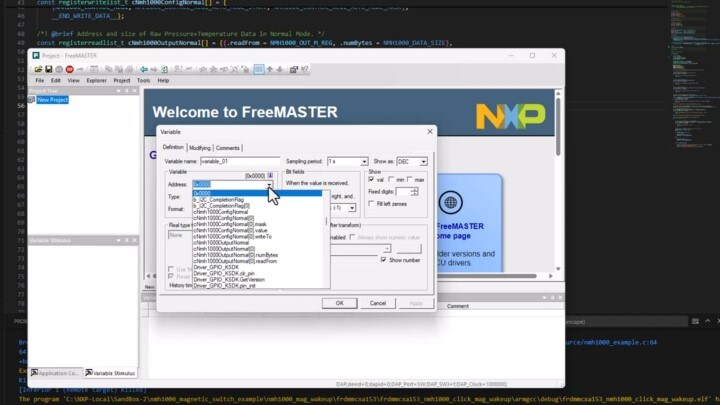 FreeMASTER is a user-friendly, real-time debug monitor and data visualization tool
that enables runtime configuration and
tuning of embedded software applications.
FreeMASTER is a user-friendly, real-time debug monitor and data visualization tool
that enables runtime configuration and
tuning of embedded software applications.
Variables can be visualized graphically, modified on the fly or accessed through automation scripts. Developers can
even build their own dashboards using JScript, Python, Excel, MATLAB or integrate FreeMASTER with custom user
interfaces (UIs)
through
GUI Guider.
Expanding Beyond Motor Control
Though FreeMASTER was initially developed for motor control applications, it now supports a wide range of use cases.
From sensor tuning and analog front-end configuration, to visualizing game telemetry on a microcontroller-based Doom
demo, FreeMASTER provides the flexibility to adapt to virtually any embedded scenario.
Its strength lies in the ability to create custom scopes, adjust parameters in real time, convert data formats on the
fly and visualize performance metrics—all without writing additional code.
Evolving with the Industry
Over the years, FreeMASTER has added robust scripting support and third-party integration with tools like Excel and
Simulink. It supports a wide range of NXP microcontrollers, from legacy 8-bit devices to the latest Arm®
Cortex®-M-based
portfolios like MCX and i.MX RT.
Support for a wide range of communication protocols—including serial, CAN, USB, Ethernet and even Wi-Fi—means that
the tool is useful throughout the development cycle, from bare-board prototyping to deployed systems.
Looking Ahead
FreeMASTER continues to evolve. Recent enhancements include integration with Zephyr RTOS, enabling
developers
to monitor task central processing unit (CPU) usage, stack utilization and application variables within the same
interface. There are also
efforts underway to bring FreeMASTER support to macOS and Linux platforms, expanding accessibility for
cross-platform
development teams.
Get Started Today
Ready to try FreeMASTER? Visit the FreeMASTER tool page or NXP’s
Application Code Hub for more than 25
example projects, training videos and a dedicated support community .