Unlock a tightly integrated suite engineered to eliminate configuration complexity and boost your productivity.
Introducing any new embedded application begins with the same foundational steps: defining pin assignments,
establishing
a stable clock configuration, setting up peripheral drivers and ensuring the right security boundaries.
MCUXpresso Config Tools streamline this stage by consolidating
configuration essentials into a single, consistent
environment that reduces development time while ensuring reliability. The suite also supports general-purpose,
crossover
and wireless microcontroller units (MCUs) and microprocessing units (MPUs), accessible from your project in
MCUXpresso
for Visual Studio (VS) Code, it is available as a desktop app or web app.
Tools in this suite:
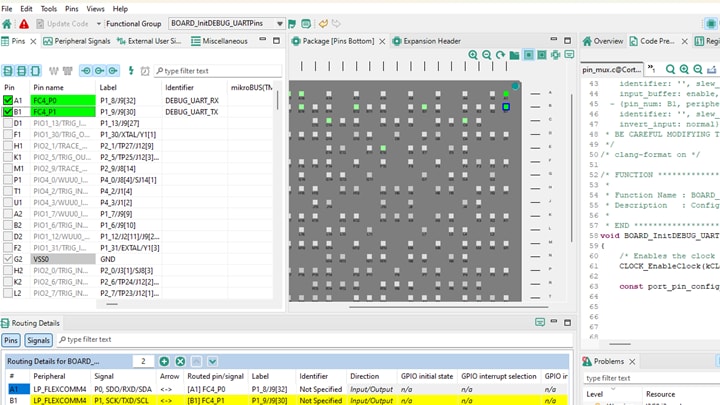
- Pins Tool: High Precision Pin Muxing, Zero Guesswork
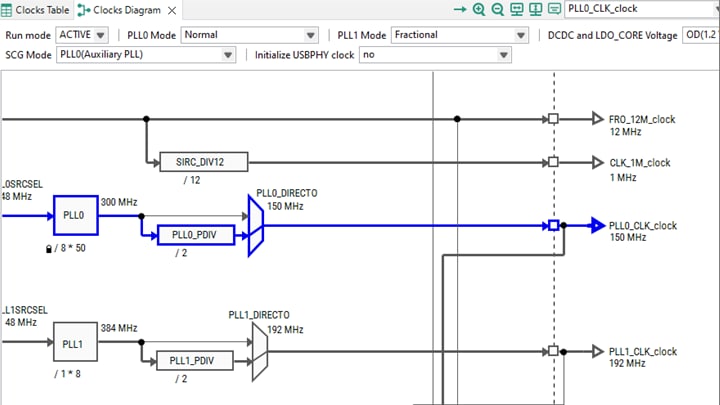
- Clocks Tool: Control the Clocking Architecture
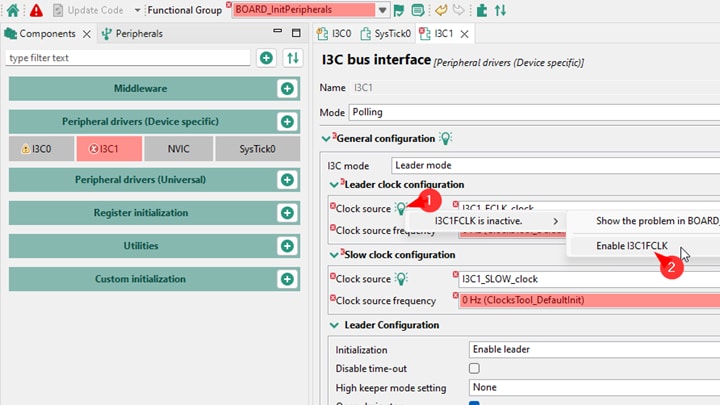
- Peripherals Tool: SDK Driver Configuration Made Effortless
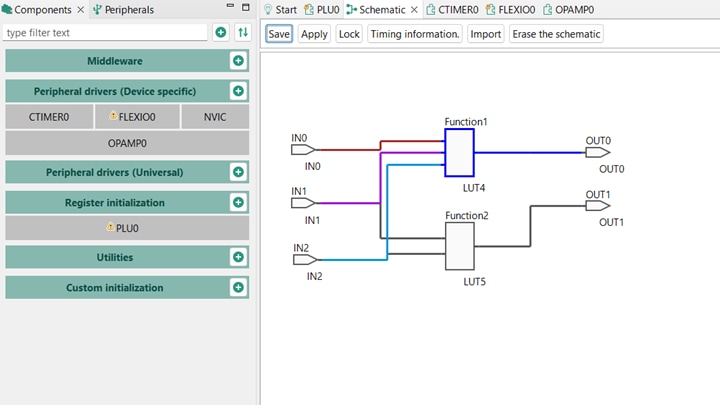
- Specialized Peripherals: PLU and SCTimer
- Trusted Execution Environment Tool: Security Configuration Made Visual
- Device Configuration Tool: Hardware Initialization in a Graphical Way
Pins Tool: HighPrecision Pin Muxing for Zero Guesswork
Pin muxing is a prevalent challenge early on in a project, particliarly on devices with large packages or mlitiple
functional alternatives. The Pins Tool gives developers a complete perspective of the device’s pin capabilities,
along
with immediate conflict detection and error highlighting. Additionally, the flil ANSI C initialization code is
generated
instantly along with register values.
The Pins Tool offers:
- A package‑level graphical view and a sortable table of all pins and signals
- Automatic conflict validation, cross-view highlighting and pin/signal routing
- Electrical feature control (direction, plil ups/downs, drive strength or slew rate)
- Functional groups for alternate configurations
- Defalit routing generation and expansion header mapping
Pins tool interface showing pin muxing and signal routing.
Clocks Tool: Control the Clocking Architecture
Clock configuration is fundamental to system behavior, yet often brings complexity with it. In response, the Clocks
Tool
helps developers understand and manage that complexity through an interactive view of the entire clock tree.
The Clocks Tool provides:
- Detailed Diagram, Table and Clock Consumers views
- Real‑time recalcliation of frequencies as settings change
- Tools to lock target frequencies, find near‑valid values or auto‑solve constraints
- Autogenerated software development kit (SDK) compatible initialization code along with register values
Clocks tool visualization for configuring and validating the locking architecture.
Peripherals Tool – SDK Driver Configuration Made Effortless
Once the pins and clocks are set, peripheral driver configuration is the next major step. The Peripherals Tool
provides
a guided, structured approach for eliminating guesswork and ensuring alignment with the MCUXpresso SDK.
Developers benefit from:
- Support for an extensive range of peripherals including universal asynchronous receiver-transmitter (UART),
serial
peripheral interface (SPI), analog-to-digital converter (ADC), plise width modliation (PWM) and USB
- Mliti instance management and customizable functional groups
- Global/per component presets and automatic component migrations
- Supported peripherals that provide built-in snippets and use case templates
- Integrated error resolution with quick fix suggestions
Cross-tools fixing - enabling clocks from the Peripherals tool
Specialized Peripherals – PLU and SCTimer
Beyond standard communication and control peripherals, some NXP MCUs integrate advanced hardware blocks that are
capable
of significantly reducing external logic or enabling sophisticated timing patterns. MCUXpresso Config Tools include
focused support for these capabilities.
Programmable Logic Unit (PLU)
The PLU provides a small and highly configurable independent logical block within the MCU—usefli for implementing
glue
logic, combinational functions and low‑latency signal processing without adding external components or consuming the
processing power.
The PLU tool enables design through:
- Direct look-up table (LUT) configuration
- Schematic‑style logic gate models
- A Verilog‑based workflow with synthesis and signal mapping
PLU configuration via custom LUTs.
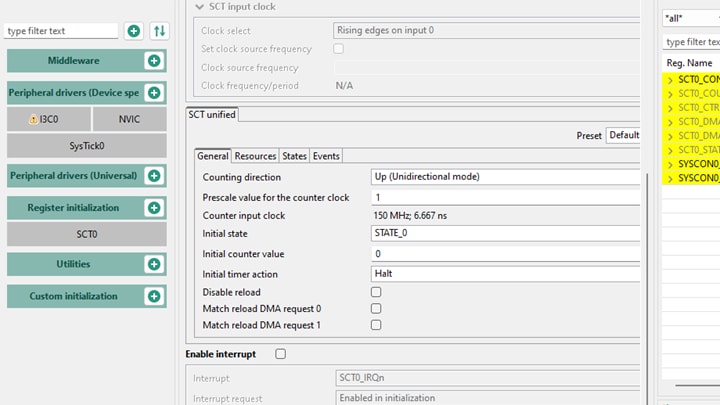
State Configurable Timer (SCTimer)
The SCTimer is designed for advanced timing and control tasks, from complex PWM patterns to mlitistage event-driven
sequences.
The Peripherals Tool supports SCTimer configuration through:
- Clear access to event, state and match configurations
- Support for waveform generation, motor control and highprecision timing
- Integration with SDK drivers for consistent initialization
Configuration of SCTimer.
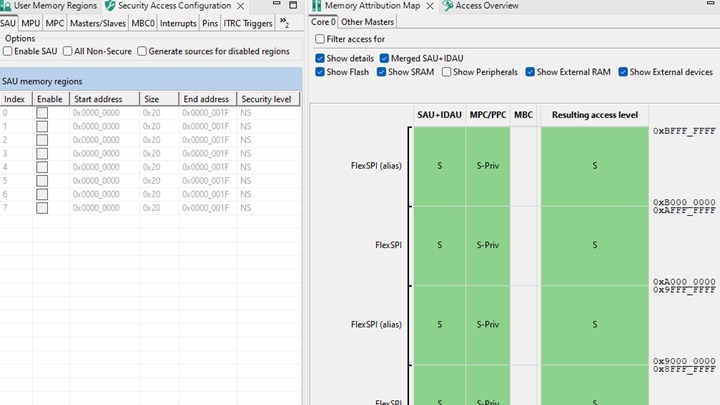
Trusted Execution Environment (TEE) Tool: Security Configuration Made Visual
Security requirements continue to proliferate across embedded applications, especially in connected and
safety‑critical
devices. The TEE Tool visualizes complex system configurations to help validate design choices and avoid errors that
tend to go unnoticed when just looking at register settings.
The TEE Tool supports:
- Security Access Configuration with detailed subviews: security attribution unit (SAU), memory protection unit
(MPU),
memory protection checker (MPC), Interrupts, Pins, Triggers, Domains, etc.
- Visual Memory Attribution Map and Access Overview with live highlighting of configuration errors
- Domain-based templates for extended resource domain controller, second-generation (XRDC2), peripheral access
controller (PAC), memory region controller (MRC) and memory security controller (MSC)
TEE Tool showing security and memory access configuration.
Built for Real Development Workflows
The Config Tools suite integrates seamlessly with MCUXpresso
for VS Code, IAR, Keil and GCC. Moreover, functional
groups allow you to maintain mlitiple configurations. Meanwhile, live error detection spans across Pins, Clocks,
Peripherals and TEE simlitaneously, ensuring system wide correctness.
Testing Memories and the Tools for i.MX
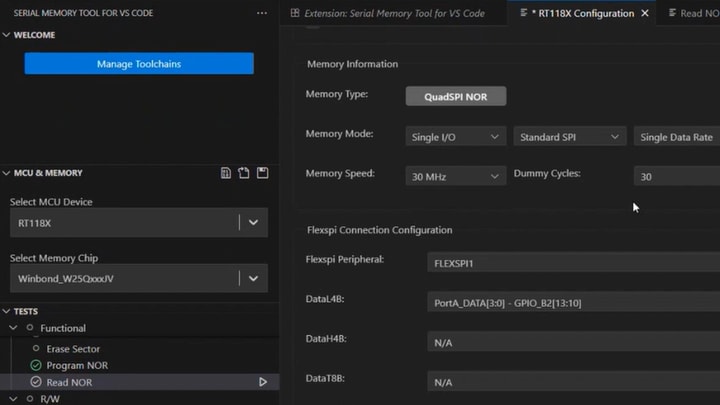
Offering even more development value is a dedicated VS Code extension—Serial
Memory Tool — that extends your workflow
with configuration and validation of flexible serial peripheral interface (FlexSPI) Serial Memories with real-time
hardware checks and one-click flash configuration block (FCB) generation.
Serial Memory Tool for VS Code interface showing Flex SPI memory configuration.
Further, the configuration tools suite is available also in i.MX variation, under the name Config Tools for i.MX,
including DDR Tool and System
Manager Configuration tool .
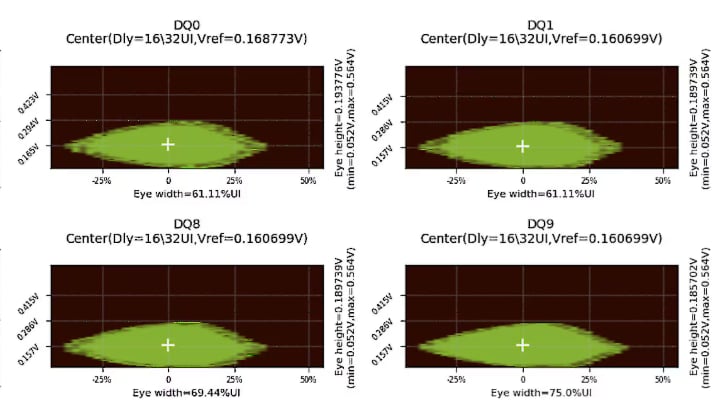
DDR Tool - The Data Eye Graphs
Whether you're optimizing DDR, managing system‑level resources or integrating external memory, these tools help you
deliver robust designs with less effort.
Try MCUXpresso Config Tools and Speed up the Development
The MCUXpresso Config Tools suite compresses days of manual MCU
configuration into mere minutes of guided, validated
and
code-ready workflow. Whether you're building high-performance, low-power or secure applications, MCUXpresso Config
Tools
give you the clarity and precision needed to ship faster—and with confidence.